Native Salesforce AppExchange App

Run Reports on Salesforce Files & Mass Download with One Click

The native Salesforce application that saves your time, effort, and money. Report on files, notes, and attachments — then bulk-download exactly what you need in seconds.

  • Run report on Salesforce Files & Attachments
  • Mass download files & attachments in bulk
  • Download all files from a single record at once
  • Filter downloads by file type
  • Mass download Static Resources & Documents
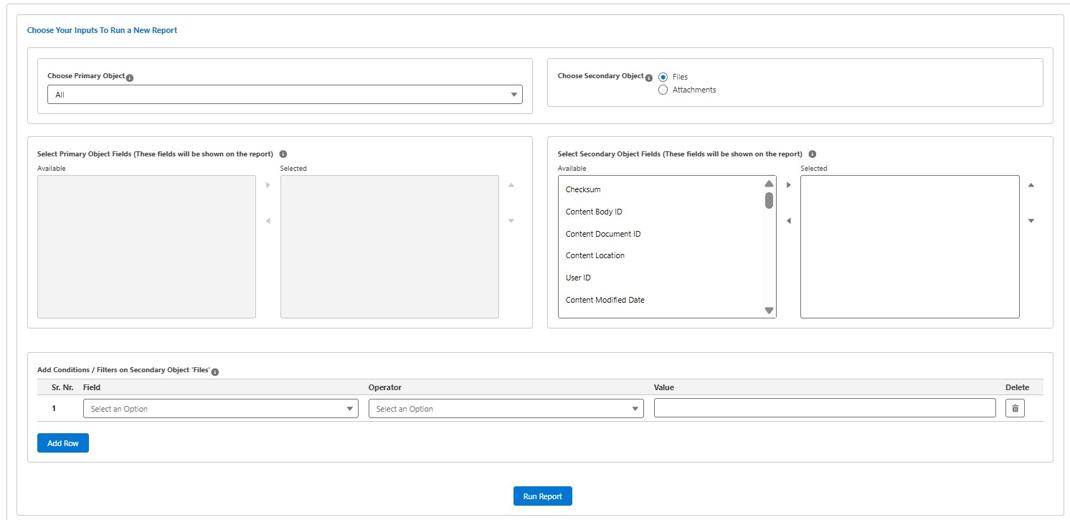
SFDC File Manager dashboard showing file report and bulk download interface
Data stays in Salesforce No-code setup Easy to install
The Problem We Solve

Running Reports on Files Shouldn't Be This Hard

Salesforce doesn't give you a native way to report across files and attachments, or to download them in bulk. SFDC File Manager closes that gap — without any external data transfers.

Report on Files by Object

Find which Accounts, Cases, or any object have (or don't have) files attached — instantly.

Bulk-Download Files

Select multiple records and download all associated files in one ZIP — no manual clicking.

Download by File Type

Filter your download by .pdf, .docx, .jpg, or any file type you need.

Export Reports as CSV

Take your file inventory offline. Export a full report as CSV for analysis or archiving.

What Makes It Unique

Everything You Need to Manage Salesforce Files

Powerful reporting capabilities combined with one-click bulk downloads — all natively inside Salesforce.

Report on Objects With Files

Instantly see which records — Accounts, Leads, Cases, and more — have files or attachments linked to them.

Report on Objects Without Files

Find records with missing attachments so you can proactively fill the gaps in your data quality.

Mass Download Files & Attachments

Select records and download all their files in one go. No more opening records one by one.

Add Filters / WHERE Clause

Refine your reports with custom filter conditions — just like writing a SOQL WHERE clause but without the code.

Save Reports for Later

Build a report once, save it, and re-run it any time. Your team can share saved reports across the org.

Download Report as CSV

Export your file inventory to CSV for sharing with stakeholders or importing into other tools.

Download All Files From a Record

Open any single Salesforce record and download every file attached to it with a single click.

Download Static Resources

Export Static Resources and Documents from your Salesforce org in bulk for backup or migration.

Filter by File Type

Download only the file types you need — PDFs, images, Word documents — and skip the rest.

Download files from a Salesforce record using SFDC File Manager
Record-Level File Management

Manage Files Directly From Any Record

Open any Salesforce record and take full control of its files — no more clicking through attachments one by one.

  • Download all files at once from a record instead of clicking on every single attachment or file
  • Quickly download files by file type — just click a file extension filter to narrow the selection
  • Download individual files or package everything into a single ZIP
  • Delete multiple files at once to keep your records clean
  • Remove file links from a record without deleting the underlying file

Have Questions? We're Here to Help.

Schedule a consultation with our team and see how SFDC File Manager fits your Salesforce workflow.

Core Benefits

Built Native. Secure. Customisable.

SFDC File Manager is designed from the ground up to work inside Salesforce — not around it.

Get Started

Runs Reports & Mass Downloads

Combine reporting on files with instant bulk-download capability — all in one tool.

100% Native Salesforce Application

Runs entirely within your Salesforce org with the same native look, feel, and security model.

Customisable to Your Needs

Need a specific workflow or custom field in your report? The app can be tailored to your exact requirements.

Data Resides in Salesforce Only

Your data never leaves Salesforce. There are no third-party integrations, no external servers, no privacy risks.

Trusted By Salesforce Teams Worldwide

0 Downloads per Month
0 Active Installations
0 Countries Using SFDC File Manager
Customer Reviews

What Our Customers Say

Real feedback from Salesforce professionals who rely on SFDC File Manager every day.

★★★★★ 5.0 average rating
★★★★★

We wanted to know how many Accounts in our org have files and wanted to get rid of some of them to free up storage. This app helped us achieve that within an hour!

Mark Smith Salesforce Practice Head
★★★★★

Exactly what we needed for our Salesforce file cleanup project. The bulk-download by file type is a game-changer. Saved us days of manual work.

Sarah Reynolds Salesforce Administrator
★★★★★

Simple to install, runs natively in Salesforce, and does exactly what it says. The support team was also very responsive when we had a question about customisation.

James Patel CRM Manager
FAQ

Frequently Asked Questions

Quick answers to the questions we hear most often.

View All FAQs
SFDC File Manager is a native Salesforce application that lets you run reports on files, notes, and attachments linked to any Salesforce object, and mass-download them with a single click. It is installed from the Salesforce AppExchange and runs entirely within your Salesforce environment.
Yes, absolutely. SFDC File Manager is a 100% native Salesforce application. All your data, files, and configurations remain within your Salesforce org at all times. There are no external servers, no third-party data transfers, and no privacy risk.
Yes. You can run a report on any Salesforce object — including Accounts — to see all files and attachments linked to it. You can also filter by file type, date, or add custom WHERE clauses to narrow down the results.
Yes. You can generate a report on all files or all attachments across your entire org. This is especially useful for storage audits, compliance reviews, or bulk data cleanup projects.
Ready to Get Started?

Start Managing Your Salesforce Files Today

Install SFDC File Manager from the Salesforce AppExchange and bring order to your file data in minutes.